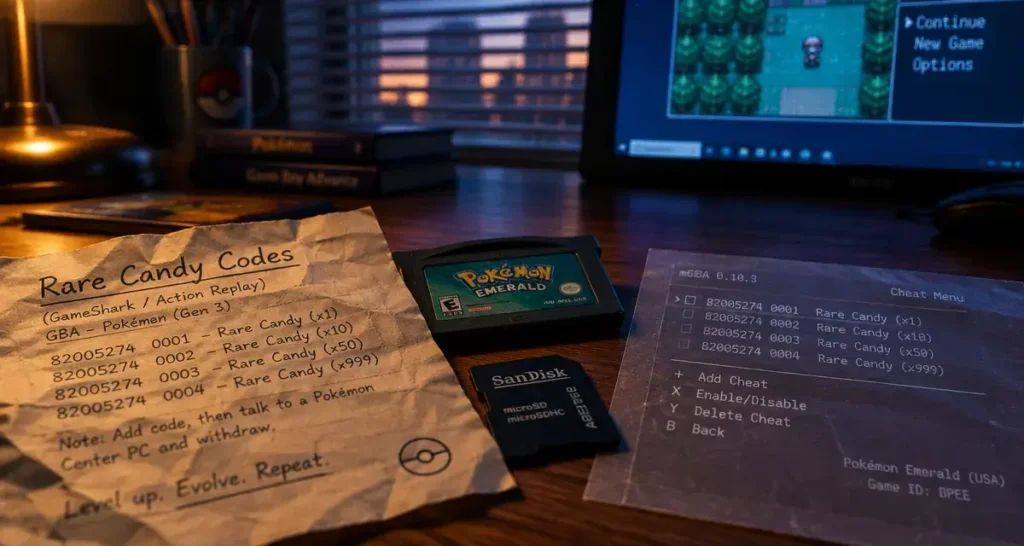
For Pokémon Emerald on Game Boy Advance, 82005274 0044 is a commonly listed CodeBreaker Rare Candy shop modifier, while 82005274 0001 selects Master Balls. Enter only one at a time in your emulator’s cheat menu, check the shop inventory, and disable the code after obtaining the item. Compatibility depends on your game version and emulator, so back up your save before trying either.
Cheats for money, encounters, and travel need the same care: the correct code format, any required prerequisite, and a clear stopping point. A code labeled “working” is not automatically verified for your setup.
Start with Rare Candies and Master Balls
These two item modifiers share the base 82005274. The final four hexadecimal characters identify the item: 0044 for Rare Candy and 0001 for Master Ball. Enter the complete address-and-value pair, including the space, rather than entering the suffix separately.
| Desired item | Complete code | Cheat format | In-game use |
|---|---|---|---|
| Rare Candy | 82005274 0044 | CodeBreaker | Check the first item offered at a Poké Mart. |
| Master Ball | 82005274 0001 | CodeBreaker | Check the first item offered at a Poké Mart. |
These are shop modifiers, not promises of an unlimited stack appearing in your Bag. Activate one, open the shop’s purchase menu, and confirm that the expected item appears before buying. If you already had the menu open, close it and reopen it. After purchasing, disable the cheat and check your Bag.
No separate master code is included with these entries. Do not add an unrelated master code simply because another cheat list recommends one for a different code family. These examples are not independently tested here, and no universal ROM or emulator compatibility is claimed.
Rare Candies reduce leveling time, while Master Balls simplify catching Pokémon. Neither requires leaving the modifier active throughout your adventure. Obtain what you need, switch the cheat off, and verify normal shop behavior before continuing.
Enter codes using the right format and save protection
Create a recovery point outside the emulator
First, save through Pokémon Emerald’s own menu. Then export or copy the battery-save file, commonly a .sav, using your emulator’s save-management options. Keep that copy separate from the active save. A save state captures an emulator session, potentially including an already-glitched situation; it is useful, but it should not be your only backup.
Think of your test session as a small cocoon around the real playthrough: keep an untouched save outside it, perform one controlled change inside it, and carry the result forward only after checking it. This separation matters because turning a cheat off stops further modification but may not undo items, Pokémon, or progression changes already written into the save.
Add and test one complete cheat
- Load Pokémon Emerald and open the emulator’s cheats menu.
- Create an entry with a descriptive name, such as “Rare Candy shop modifier.”
- Select the matching format: CodeBreaker, GameShark, or Action Replay as specified for that code.
- Paste the full code, preserving its values and any required line grouping.
- Enable it, perform the intended in-game action, and inspect the result.
- Disable it, confirm normal gameplay, and only then consider saving.
GameShark, GameShark v3/Action Replay, and CodeBreaker are not interchangeable labels. Some emulators group certain formats together; others expose separate choices. Do not change the code’s characters to make it fit an entry field.
For a multiline cheat, keep its lines together when the emulator supports that format. If it requires separate entries, follow its documentation rather than guessing. A master code is a prerequisite used by some cheat sets, not a universal unlock: add only the one explicitly paired with the intended cheat.
Choose money and Pokémon cheats by their actual effect
Money, items, and EXP solve different problems
An item modifier changes an item selection; it does not necessarily change your money or item quantity. Likewise, an “infinite money” cheat may repeatedly write a balance rather than remove shop prices. Money displays may need refreshing by closing and reopening a menu, but repeated failure is a reason to stop and check compatibility, not activate extra codes.
For money, EXP, move, or stat cheats, use an entry that specifies the complete code, format, prerequisites, and activation instructions. A hexadecimal value without those details is not enough. Avoid combining a money modifier with a shop modifier during your first test: separate tests make unexpected results easier to diagnose.
Species, level, and shiny modifiers are separate layers
A wild encounter modifier chooses which Pokémon appears. A level modifier affects its level, while a shiny modifier targets another property. Some cheat sets combine these with a shared prerequisite, but that does not make every species, level, and shiny code mutually compatible.
Start with the species modifier alone and trigger an ordinary wild encounter. Disable it after the intended encounter and check the captured Pokémon’s summary before saving. Test level or shiny changes separately unless the complete set explicitly documents their combined use. Avoid saving if names, sprites, moves, or other details appear abnormal.
No encounter or money code is labeled verified here without a reproducible test environment. Community-shared entries can be useful, but they still need a matching ROM revision and clear instructions. A long list of unexplained codes offers less practical value than one correctly identified entry.
Treat wall, warp, and event cheats as temporary tools
Walk-through-walls and warp cheats carry navigation risks that item modifiers do not. Passing through a barrier can place your character somewhere normal movement cannot escape. Before testing traversal changes, stand on ordinary, accessible ground and keep a recovery save from before activation.
Warp codes may redirect the destination reached through a door or entrance. Activate only the intended destination code, cross the required threshold, and disable it immediately after arrival. Leaving it enabled can redirect the next doorway as well, preventing a normal exit.
Event destinations include Southern Island, Navel Rock, Birth Island, and Faraway Island. Associated access items include the Eon Ticket, Mystic Ticket, Aurora Ticket, and Old Sea Map. Possessing an event item is not necessarily equivalent to activating its event. Inventory changes, travel access, and event progression can require different conditions.
If a warp leaves you stuck, disable all cheats first. Try normal movement or an accessible exit without saving. If you remain trapped or the game behaves incorrectly, reload the pre-test save. Adding another unverified warp to escape makes recovery less predictable.
Fix failed cheats without risking your main save
Compatibility depends on the combination of ROM region, ROM revision, code format, and emulator implementation. A success report from Delta does not establish the same result in My Boy, Visual Boy Advance, mGBA, or a RetroArch core. Emulator version and configuration can also matter.
For example, 91mobiles identifies standard Pokémon Emerald (U) v1.0 for its verified-code section, while Retro Dodo describes testing with Delta on iOS. Those are specific testing claims, not guarantees for every Emerald release, modified ROM, or emulator.
- No effect: check every character, the selected format, activation toggle, and required in-game trigger.
- Wrong item or Pokémon: disable the cheat and check the suffix, game version, and other active modifiers.
- Freezing: restart with cheats disabled and load a clean in-game save.
- Repeated warping: disable the destination code before crossing another entrance.
- Problems remain after deactivation: restore the untouched backup rather than overwriting it.
On original Game Boy Advance hardware, the game itself has no emulator-style cheat menu; compatible physical cheat hardware is required, with its own format restrictions. Whatever platform you use, keep the same routine: back up, activate one documented cheat, verify its effect, disable it, and save only when the result is sound.